![]() | ![]() |
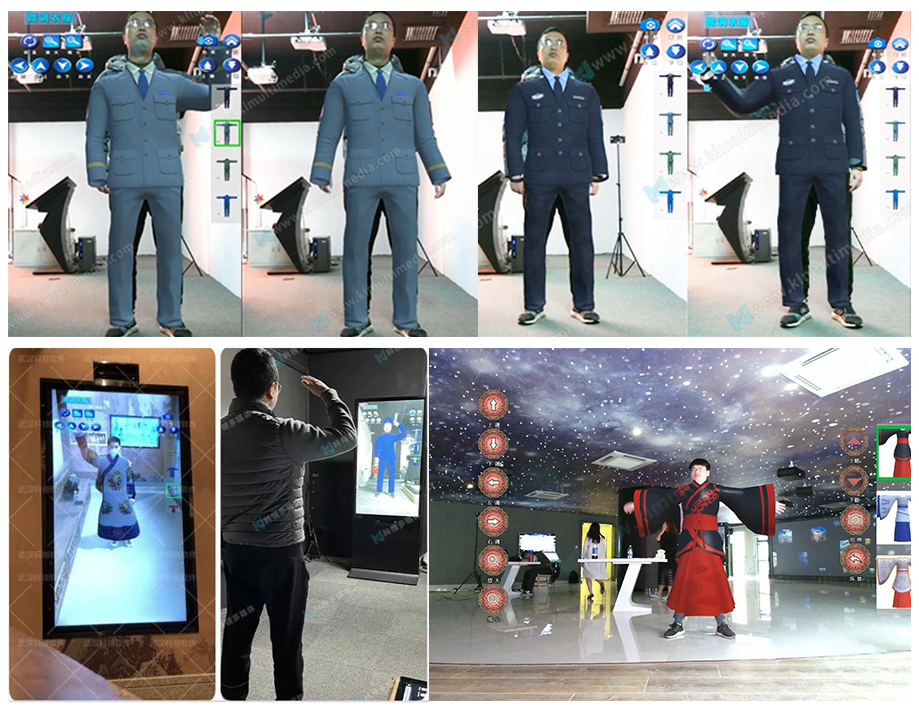
VR fitting is welcome to be used in virtual-fitting-room in the store so that visitors can try on different clothes to check whether they would like to buy.
● Support 2D png file as clothes.
● 120 3D Clothes can select.
● Support customize new clothes.
| 1 | 2 | 3 |
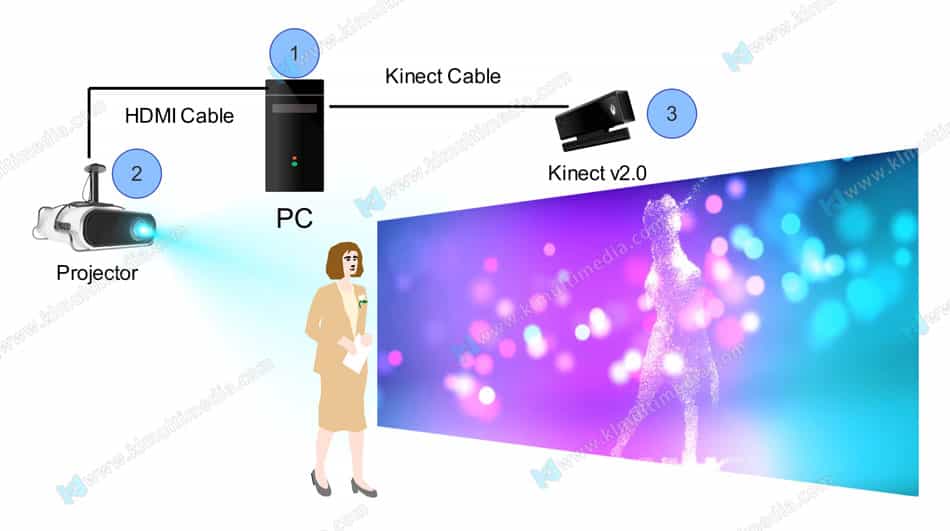
PC 1.Receive sensor interactive signals 2.Run interactive software | Display Device Any kind of digital display device like projector, Led screen, or monitor.etc | Sensor/Kinect v2.0 Detect interactive signals and transmit them to interactive software. |
| Display resolution and area: | 1080 * 1920, 55-inch or larger vertical touch screen signage |
| You prepare kits: | computer LCD screen, KINECT2.0 adaptor and cables. |
| Touch method: | infrared |
| OPS computer: | Suggest delivered by us 【CPU】I5-7500 【Memory】8G [Hard Disk] Solid State 128G [Graphics card]:GTX1050TI-4G 【Tower Size】: mini 【Operating System】: Windows 10 Professional Edition |

![]() | How to install the KinectV2.0 sensor? |
![]() | How to use all-in-one interactive signage? |
![]() | How to see other related products video? |
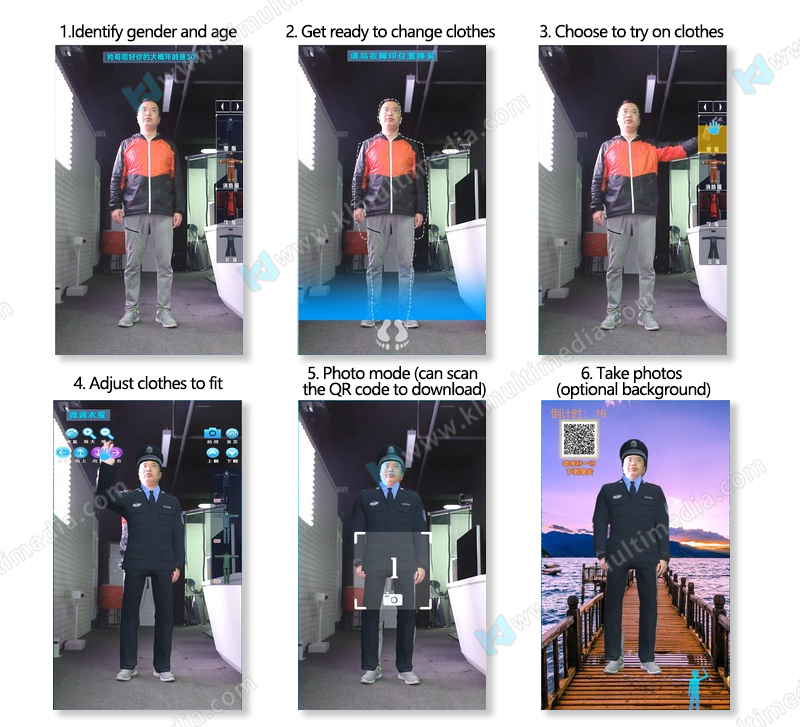
3D virtual fitting for museum is one of the most popular and applied products in the field of virtual reality and AR games. VR fitting is played in the form of projection, capturing real-time live images through a tactile camera, and overlaying 2D images or 3D models of clothing onto the experimenter's image. Users use gestures to select different types of clothing to try on, and the size of the virtual clothing automatically adapts to the wearer's body shape (or can be controlled to zoom in, zoom out, and position), achieving the fusion of virtual clothing and real experimenter's body shape, Experiencers can also take photos and share. It is widely used in virtual reality and AR games.

![]() | ![]() |
VR fitting is welcome to be used in virtual-fitting-room in the store so that visitors can try on different clothes to check whether they would like to buy.
● Support 2D png file as clothes.
● 120 3D Clothes can select.
● Support customize new clothes.


| 1 | 2 | 3 |
PC 1.Receive sensor interactive signals 2.Run interactive software | Display Device Any kind of digital display device like projector, Led screen, or monitor.etc | Sensor/Kinect v2.0 Detect interactive signals and transmit them to interactive software. |

| Display resolution and area: | 1080 * 1920, 55-inch or larger vertical touch screen signage |
| You prepare kits: | computer LCD screen, KINECT2.0 adaptor and cables. |
| Touch method: | infrared |
| OPS computer: | Suggest delivered by us 【CPU】I5-7500 【Memory】8G [Hard Disk] Solid State 128G [Graphics card]:GTX1050TI-4G 【Tower Size】: mini 【Operating System】: Windows 10 Professional Edition |
![]() | How to install the KinectV2.0 sensor? |
![]() | How to use all-in-one interactive signage? |
![]() | How to see other related products video? |
3D virtual fitting for museum is one of the most popular and applied products in the field of virtual reality and AR games. VR fitting is played in the form of projection, capturing real-time live images through a tactile camera, and overlaying 2D images or 3D models of clothing onto the experimenter's image. Users use gestures to select different types of clothing to try on, and the size of the virtual clothing automatically adapts to the wearer's body shape (or can be controlled to zoom in, zoom out, and position), achieving the fusion of virtual clothing and real experimenter's body shape, Experiencers can also take photos and share. It is widely used in virtual reality and AR games.
Copyright© 2013 KLEADER LTD All Rights Reserved | Sitemap